What's coming to Umetrics® Studio
Published November 20, 2026
This page describes changes that will be introduced in Umetrics® Studio within the next few weeks, and what they mean for how you work.
A new structure for data: from projects to assets and folders
We are improving the user experience in Umetrics® Studio by changing the way data is structured. Projects will be replaced by a separate asset management area, where you can organize your data in folders. Data will no longer belong to a specific project.
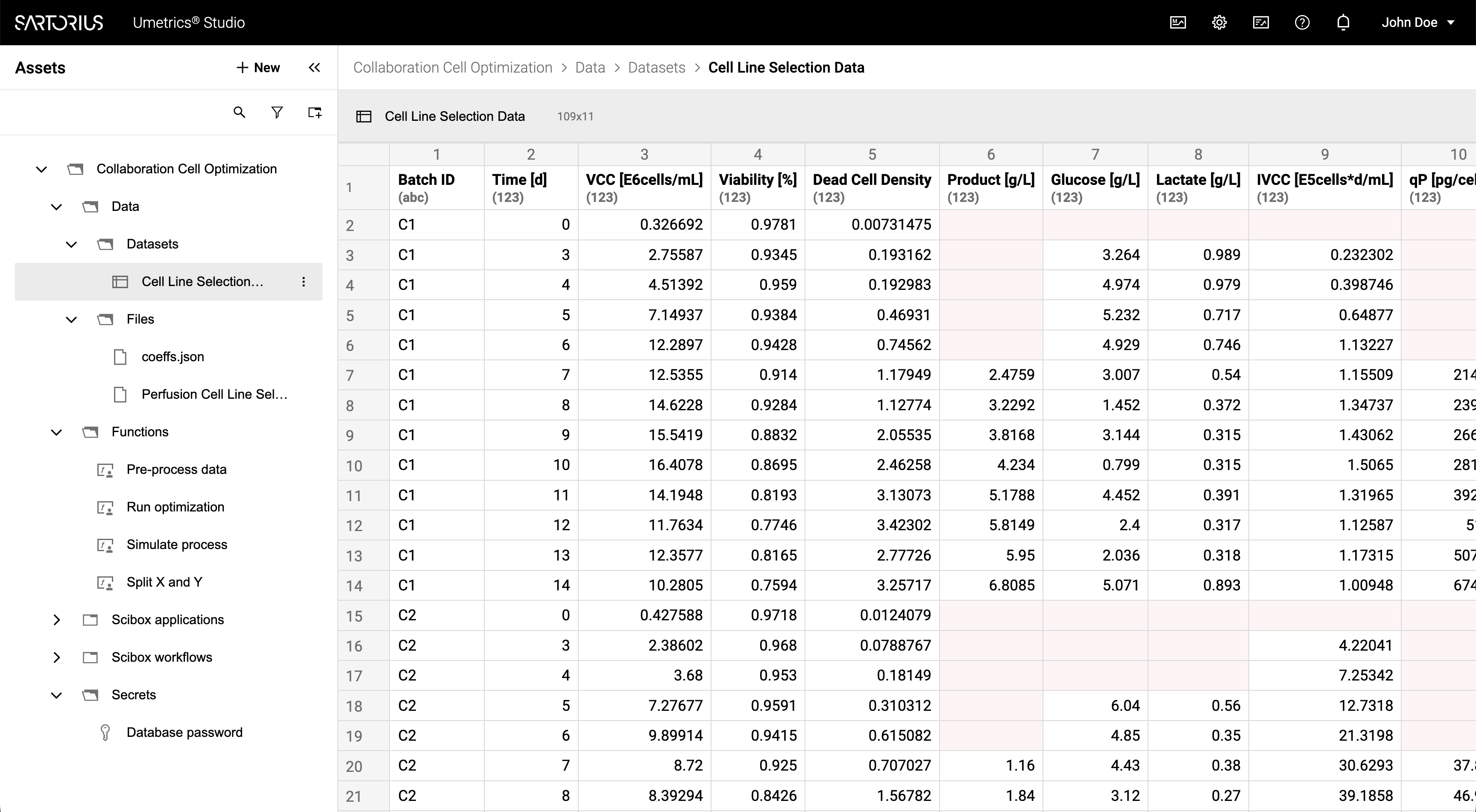
Functionality of the asset management area
The asset management area will allow you to:
- Create, rename, and hide assets and folders to organize your data.
- Move assets and folders.
- Search for assets by name.
- Filter assets by type.
- Toggle the visibility of hidden assets and folders.
- View asset details, including metadata and access permissions.
- Update access permissions for assets, including sharing with other users or groups.
Updates to existing functionality
The new structure changes how some existing parts of Umetrics® Studio work, and removes a few features. The sections below describe what changes.
Landing page
The new landing page will show the asset management area on the left side of the page. Umetrics® Registry and System settings will move to the top navigation bar.
Access
Access is currently managed at the project level. In the new structure, access will be managed at the asset level, and you will be able to share assets and folders with other users or groups.
Archiving replaced by hiding
It will no longer be possible to archive assets. Instead, you will be able to hide assets and folders to remove them from the asset management area. Hiding does not delete anything, and you can show hidden assets and folders again at any time. Assets that are already archived will become hidden.
Asset library removed
The asset library will be removed. Data that was used from the asset library remains available in the new structure.
Explore (Beta) removed
Explore (Beta), the Batch Evolution Modelling workspace, was disabled for new use, but existing workspaces have remained accessible. In the new structure, Explore (Beta) will be removed. Data that was used in Explore (Beta) remains available in the new structure, but the models created in Explore (Beta) will no longer be accessible.
What you need to do
No action is required. Your existing data will be migrated automatically as follows:
- A new folder called Projects is created. Each project becomes a folder inside it, containing the project's assets.
- Applications become assets. The assets that were inside an application are placed in the same folder, next to the application asset.
- Users who had access to a project keep access to its data.
- Archived assets become hidden.
Future improvements
The new asset management area is the foundation for further improvements. In upcoming releases, we plan to integrate existing functionality more closely with it. We may deliver these improvements in several steps, and will share timing and scope as they are confirmed.
For changes that have already been released, see the Release Notes.